

Summary: Release 1.9 of the pico engine lets a pico present its own user interface. A view is a shared function that returns XMLUI markup, and channel policy decides who gets to see it. This post describes the release, the sensor temperature viewer I built with it, and why a pico that can show itself to people is more complete than one that depends on someone else’s front end.
As part of making my vision for a billion thousand-dollar markets real, picos need a way to present web pages to the regular people who use the applications built on them. The classic pico engine, built and run by Kynetx, had that. Rules built HTML in KRL and changed the page a person was looking at (see Forms, Events, and Dialoging in KRL), and we were able to create fairly complex applications on top of a pico mesh that way. When we rewrote the engine in Node, APIs and cloud computing were all the rage, so we left that capability out. Applications like Fuse and Manifold used separate front ends that called the APIs the picos presented.
As part of his work with picos, Bruce Conrad built apps like PLAN that created their own interface. Bruce was trying to do that work without making any underlying changes to the engine. Consequently, he had to make some compromises that won’t work in the long run: session cookies managed in KRL, forms that post an event and then redirect to reload the page, hand-written JavaScript tucked into heredocs, and stored data interpolated straight into HTML. So I decided to remove that restriction and make whatever changes we needed in the engine to let picos present smooth, professional interfaces to their underlying functionality.
I’ve wanted to do this for a while, and I wrote about XMLUI as a possible answer in Components for Web Apps last year. But it wasn’t until Jon Udell showed me what he was doing with XMLUI that the lightbulb went on. XMLUI is a declarative component language: you describe tables, forms, cards, and navigation in markup, bind them to data sources, and let the runtime keep the page in sync with the data. There’s no build step and no framework to wire together. That seemed perfect for what picos would need to create UIs dynamically, and this release adds the ability for a pico to present a view of itself using functions that generate XMLUI.
This matters for more than convenience. A pico that can’t present views for people to use isn’t complete; it has to rely on some other service to stand between it and the people it serves. That service lives somewhere else, gets deployed separately, and doesn’t move when the pico moves to a new host. Release 1.9 gives the pico that missing piece.
Introduction to XMLUI
Most web front ends today are JavaScript applications. You fetch JSON from an API, loop over it, and build the page with React or something like it, and then you need a build pipeline, a bundler, and a place to host the result. XMLUI takes a different approach. An XMLUI app is a set of markup files: a Main.xmlui that lays out the app and its pages, a config.json with settings and theme, and a components/ directory with one file per component. A single JavaScript runtime loads those files in the browser and renders them. Jon’s introduction to XMLUI is the best place to start if you want the details.
Two components do most of the work of connecting a page to a back end. A DataSource fetches data from a URL and makes it available to the rest of the page through bindings like {readings.value}. An APICall posts data, usually from a form, and can tell named data sources to refetch when it succeeds. Everything on the page that’s bound to a data source updates when the data does. XMLUI also renders bound values as text, not HTML, so data that happens to contain markup shows up as characters on the screen instead of running in the browser.
Several features make XMLUI a good fit for picos:
Declarative markup—a view is a description of the page, which KRL can generate as easily as it generates any other string, and which a coding agent can write as easily as it writes a rule.
Buildless—the runtime fetches files relative to the page, so a server can produce those files on demand with no compile step.
Data by URL—
DataSourceandAPICallmap directly onto a pico’s queries and events.Small and permissive—one runtime file, MIT licensed like the engine, so it can ship with the engine and work offline or on a Raspberry Pi.
Taken together, these mean a pico can produce its interface the same way it answers any other query: on demand, from its own rulesets, with nothing to build or deploy somewhere else. The page is just another kind of answer. That’s what made XMLUI the right fit, and it’s what kept the engine changes as small as they turned out to be.
Changes to the Pico Engine
The design keeps two decades of pico practice: markup lives in KRL, and a view is a shared function that returns it. What’s new is the markup language and a small amount of engine support for serving it. I wanted the engine change to be small enough to review in one sitting, with everything else in KRL where it can evolve without an engine release. The engine changes are these:
The XMLUI runtime—the engine serves a pinned version of the XMLUI runtime as a static file, so there’s no CDN at runtime and an XMLUI upgrade is just part of an engine release.
A UI route—
/ui/{eci}/{rid}/serves the app for rulesetridon channeleciby handing the requested file path to a query./ui/{eci}lists the apps that channel can see.A
@viewannotation—the KRL parser recognizes@viewin doc comments and includes it in the ruleset and channel schemas introduced in release 1.8.An optional ruleset—
io.picolabs.xmluiships with the engine, like the OAuth ruleset, but isn’t installed on every pico. It builds the app shell and navigation and provides helpers for writing views.
That’s all of it. The engine doesn’t know what a view, a navigation menu, or an app is; everything that does know lives in io.picolabs.xmlui, which is KRL like any other ruleset. The developer UI also gained a View button on the Rulesets tab for any ruleset with at least one view, so you can pick a channel and open the app.
The ECI in a view’s URL names the channel the app is opened on. Normally that’s an app channel, a channel created for the app when its ruleset is installed. The app channel’s policy allows the app’s views, the queries and events those views use, and the filefunction in io.picolabs.xmlui that serves the page. It’s the page’s single point of contact with the pico: the files that make up the page and the data the page shows both come through it.
XMLUI’s runtime expects an app to be a tree of files, and io.picolabs.xmlui answers for that whole tree with a single shared function, file(rid, path). The UI route hands it the ruleset ID and whatever path the runtime asked for, and it returns the right file:
index.html—a shell that loads the runtime and, if the page has been given an access token, attaches it to data calls.Main.xmlui—lays out a page for each view and adds navigation when there’s more than one.config.json—the app’s name and theme.components/<Name>.xmlui—the markup for a single view.
To decide which views exist, it reads the app channel’s schema and keeps the functions tagged @view that the app channel’s policy allows. To render a view, it queries the view function through the app channel, so the ruleset can never show more than that channel already permits.
The ruleset is also a module for view authors. Its helpers build the DataSource and APICall markup that connects a page to queries and events, construct the right Sky URLs for the app channel, and create and rotate the app channel itself; the next section shows them at work. Because it’s optional, an app with views installs io.picolabs.xmlui alongside itself, usually from its bootstrap ruleset. Keeping all of this in KRL instead of the engine means we can change the shell, the navigation, and the helpers as we learn, without waiting for an engine release.
Because a view is just a shared function, the app channel’s policy governs views exactly as it governs any other query. If the app channel can’t call a view function, that page doesn’t exist, and the navigation never shows it. The page’s data comes from /sky/query and /sky/event on the app channel too, so the view can only reach the queries and events the app channel allows. The design document has the full reasoning, including what carried over from the classic engine and PLAN and what didn’t.
Using XMLUI in a Ruleset
An app is a single ruleset, and its views are the app’s pages. A view is a shared function with a @view tag in its doc comment that returns one XMLUI Component. Here’s a guestbook that shows the entries and lets visitors sign:
ruleset com.example.guestbook {
  meta {
    name “Guestbook”
    use module io.picolabs.xmlui alias ui
    shares entries, book
  }
  global {
    /** Guestbook entries, newest first. @returns Array */
    entries = function() {
      ent:entries.defaultsTo([]).reverse()
    }

    /**
     * Sign and read the guestbook
     * @view “Guestbook”
     */
    book = function() {
      <<<Component name=”Book”>
  #{ui:query(”entries”, “entries”)}
  #{ui:event(”sign”, “guestbook”, “signed”, {”refresh”: [”entries”]})}
  <Form onSubmit=”(toSave) => sign.execute(toSave)”>
    <FormItem bindTo=”name” label=”Name” />
    <FormItem bindTo=”message” label=”Message” type=”textarea” />
  </Form>
  <Table data=”{entries}”>
    <Column bindTo=”name” header=”Name” />
    <Column bindTo=”message” header=”Message” />
  </Table>
</Component>
>>
    }
  }
}
The helpers from io.picolabs.xmlui generate the plumbing:
ui:query—produces aDataSourcepointed at theentriesquery on the app channel.ui:event—produces anAPICallthat raisesguestbook:signedand refetches the entries when it succeeds.
A rule that selects on guestbook:signed records the entry, just as it would for any other event. There’s no redirect and no page reload; the table updates in place.
The @view annotation is what turns an ordinary shared function into a page; only functions that carry it are views, and there’s no naming convention or fallback. In the guestbook, @view "Guestbook" does three things. It marks book as a view in the ruleset’s schema, so io.picolabs.xmlui can find it (and so can an agent reading the schema through MCP). It gives the page its title in the app’s navigation. And it ties the function to an XMLUI component named by capitalizing the function name, which is why book returns Component name="Book". The annotation can also set the page’s path. For example,
@view “Settings” /settingssets the path for the settings page to /settings. A path with a parameter, like
@view “Contact” /contact/:idmakes a detail page called “Contact” that stays out of the navigation, reads the ID from the route, and is reached by links from other views.
One pattern matters more than the rest. The #{} interpolation (called a beesting) runs in KRL when the view is generated, so it’s only for constants like the ruleset ID, labels, and the URLs the helpers build. Entity variables and query results never go into #{}; they belong in a DataSource, where XMLUI renders them as text. krl check warns when a view function interpolates an ent: variable, and when the heredoc isn’t well-formed XML. I’ll come back to why this pattern matters in the section on security.
In the full guestbook ruleset, the app channel comes from ui:create_app_channel, called in a rule that fires when the ruleset is installed. It creates a channel whose event policy allows the app’s domains and whose query policy allows the app’s functions. An app can have more than one app channel, each exposing different views. A thermostat app, for example, can offer a viewer app channel that queries the dashboard but not the settings, and an admin app channel that allows both. Policy alone decides how much of the app each person sees. The pico views documentation covers the details, including detail pages with route parameters and channel rotation.
The Sensor Network Temperature Viewer
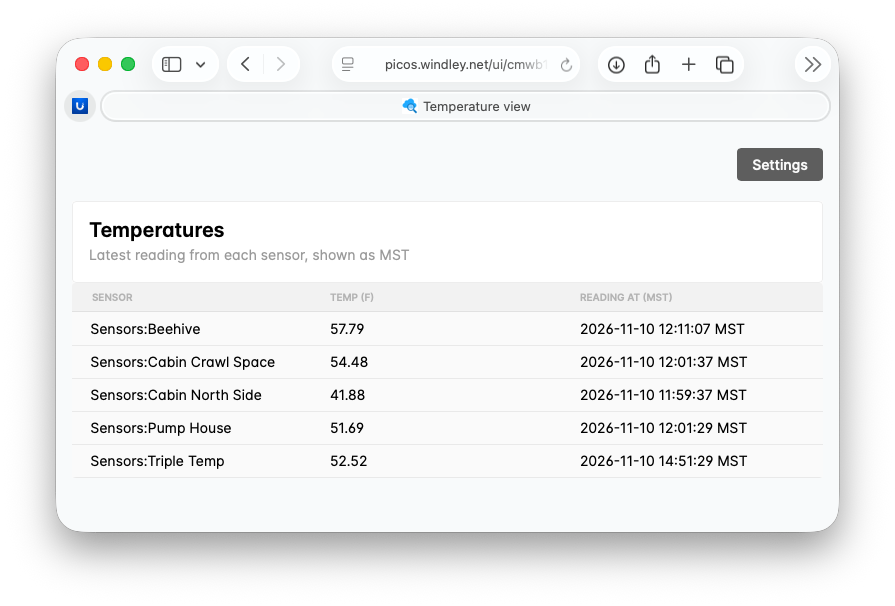
The first real view I built shows the latest temperatures from my LoRaWAN sensor network. Each sensor is a Manifold thing, and the sensors belong to a community pico that knows the last reading from each one. I wanted a page I could leave open in a browser tab that showed every sensor’s temperature and when it was read. The result is io.picolabs.sensor.temperatures_view, a single ruleset of about 175 lines, most of which are documentation and the settings form.
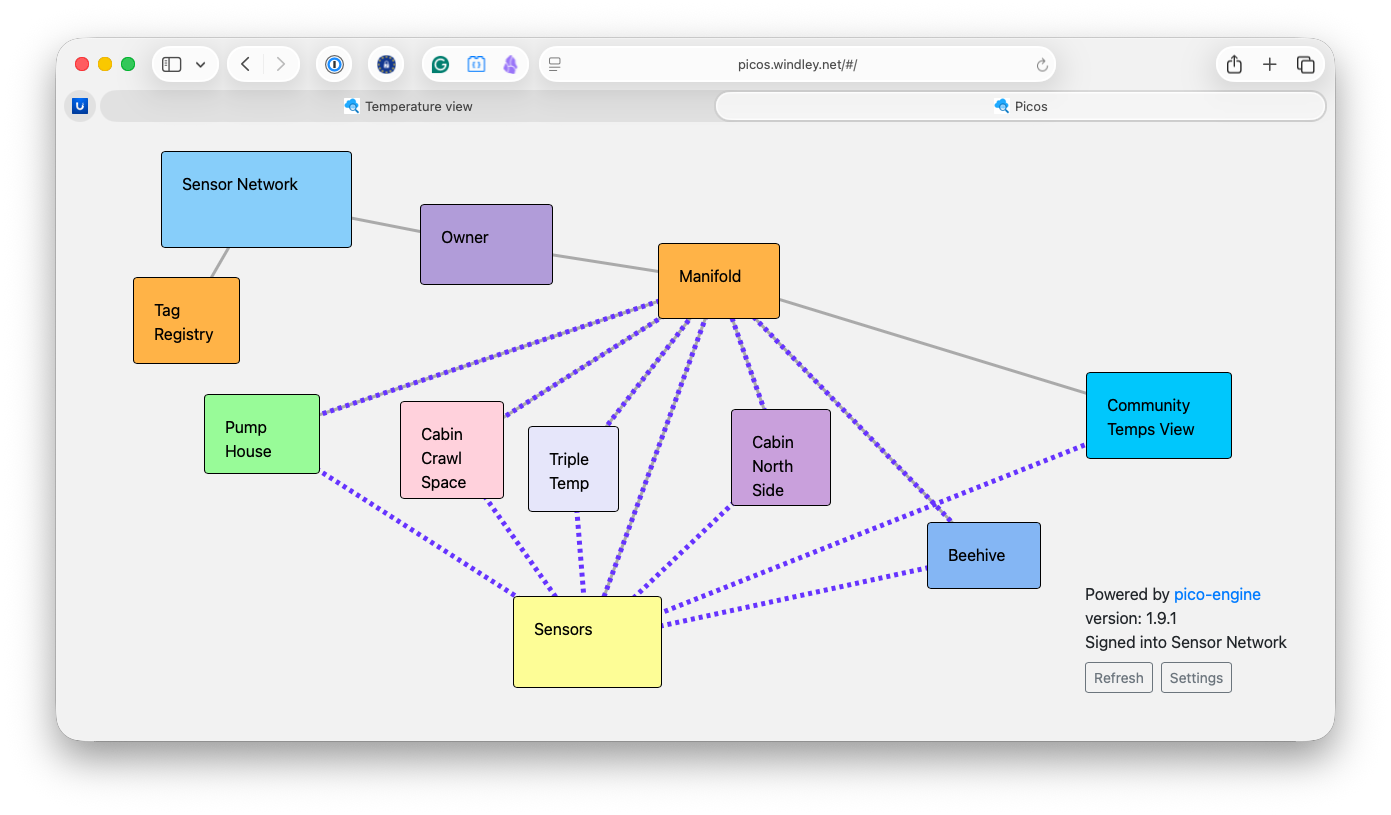
The interesting part is where the view lives. The mesh at the top of this post shows my sensor network: the Sensors community pico in yellow, the individual sensor picos around it, and the dotted lines showing the relationships between them. I didn't install the view on the community or on any of the sensors. Instead, it runs on the Community Temps View pico on the right, created just for the display, which asked the community for a relationship (the dotted line between Community Temps View and Sensors) using the community's did:webvh. That's the pico-to-pico identity work from earlier this year in action: the view pico sends an invitation with the role temperature_view, the community approves it, and from then on the view pico can query the community's lastTemperatures function over that relationship. The page binds only to the view pico's own latestTemperatures function, which makes the call to the community and formats the times.
This is the pattern I expect most real views to follow, and it isn’t new. It’s the stack architecture we’ve used for web applications since the 1990s: a presentation layer that renders pages, sitting in front of the layers that hold the logic and the data. Here the view pico is the presentation layer; it knows how to show temperatures, while the community and sensor picos know how to collect and keep them. A view only ever talks to its own pico, and when the data lives somewhere else, that pico reaches it through a relationship whose role on the other side decides what it can get.
What’s different from a classic web stack is that every layer is a pico, with its own identity, its own channels, and its own permissions. Keeping the view separate from the logic means I can add a new way of looking at the sensor data, or retire an old one, without changing the picos that do the work. The community’s only part in it is approving a relationship. The logic doesn’t care how it’s shown.
The page loads its data when it opens, polls periodically, and has a Refresh button that fetches the latest readings without reloading the page. The Settings modal lets the person viewing it choose a time zone and a theme, and paste in an access token.
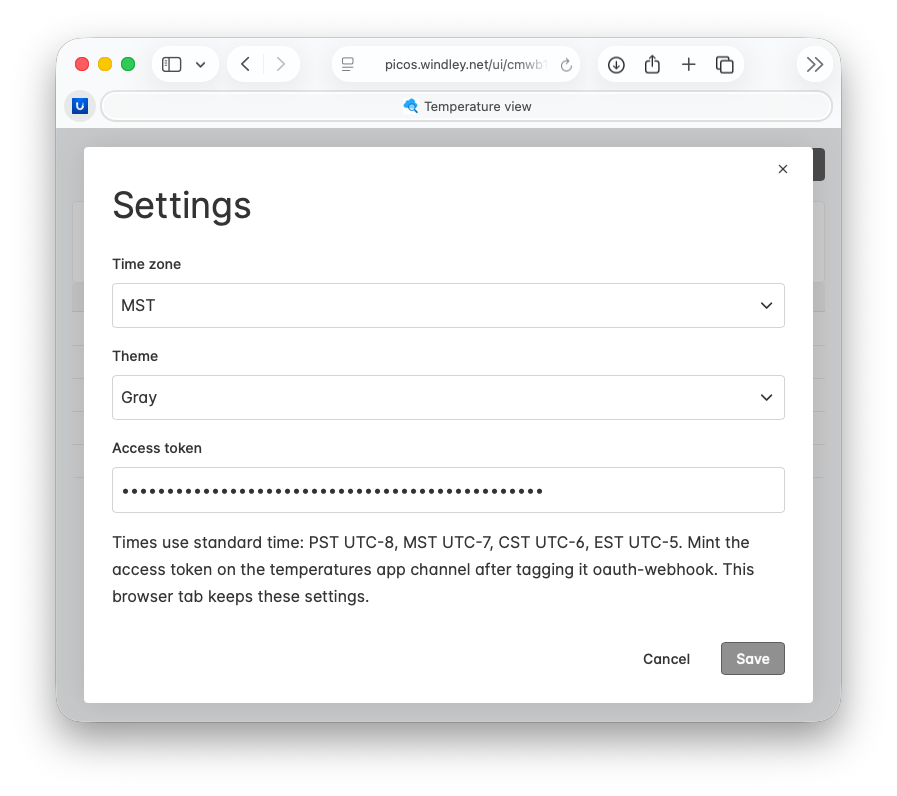
The access token is the one setting that isn’t self-explanatory, and it’s the part of the design that isn’t obvious. It’s how a page on a protected mesh gets its data without anything secret living in the ruleset or the markup. That deserves its own section.
Security
Everything under /ui/ is served without a token. That sounds alarming until you look at what those files are: the app’s markup, which is already in the ruleset source, plus the ECI and ruleset ID that are already in the URL. The pattern that makes this safe is the one from the last section. View markup never carries pico data, and rulesets never carry secrets. Data reaches the browser only through /sky/query and /sky/event, and on a mesh protected by OAuth, those routes require a bearer token. Opening a view’s URL shows you the page; it doesn’t show you the data.
On a mesh protected by OAuth, the page needs an access token before it can get any data, and that token can’t come from the ruleset. The temperature viewer gets one in three steps:
In the developer UI, I tag the view’s app channel
oauth-webhookand create a channel secret for it. The secret never leaves the developer UI.I exchange that secret for an access token at the engine’s token endpoint, using the OAuth client credentials grant with the app channel’s ECI as the client ID.
I paste the access token into the page’s Settings dialog. The page keeps it in session storage for that browser tab and sends it as a bearer token on every data call.
The token is good for that app channel and nothing else. Whoever holds it can do what the app channel’s policy allows (read temperatures, in this case) and no more. If a token leaks, creating a new channel secret revokes every token minted with the old one.
The client credentials grant is narrow on purpose, and it fits what the temperature viewer does: one page, one app channel, read-only data. It may also end up being the model for the IIW Foundation CRM, where each view should get exactly the access its app channel allows and nothing more. Applications that need to reach the whole mesh use a different grant. Home Assistant, for example, uses the OAuth authorization code grant with PKCE: the person signs in with a passkey through a registered OAuth app, and the integration gets a token that’s valid for channels across the mesh, as I described in Identity for the Pico Engine. The view shell doesn’t run that flow, so a page on a protected mesh gets its data with a channel token pasted into Settings.
Note too that the token is how the browser calls the app channel, not how picos trust each other. The view pico and the community trust each other through their DID relationship, and the browser token has nothing to do with it.
I should be clear about the tradeoffs. The main risk is cross-site scripting. The design closes the most common route for it: pico data never goes into a view’s markup, and XMLUI renders bound values as text, so a sensor name or guestbook entry that contains a script shows up as characters instead of running. That’s a lesson from the PLAN pages that put stored data straight into HTML. But XMLUI expressions are JavaScript, which makes a view code, and every pico’s pages come from the engine’s origin. A script bug in any view on an engine could read a token from session storage and use it until it’s revoked, so installing a ruleset with views is a trust decision, the same way installing a ruleset with rules already is.
Other Changes
The biggest change apart from views is the Logging tab in the developer UI. That one got left out of the 1.8 release. The Logging tab used to show one checkbox per transaction that expanded into lines of preformatted text. Now it’s a two-pane inspector, modeled on the request log in Dick Hardt’s AAuth demo. The left pane lists each step of a transaction (the incoming event or query, each rule that ran, each raise and send, and a closing row with the outcome and duration), indented so that cause and effect are visible. The right pane shows everything about the selected step: the channel and which policy rule allowed the request, the attributes or arguments, which rules fired and which didn’t, ent: writes with the value before and after, klog output, and directives. Replay opens the Testing tab for that rule or query.
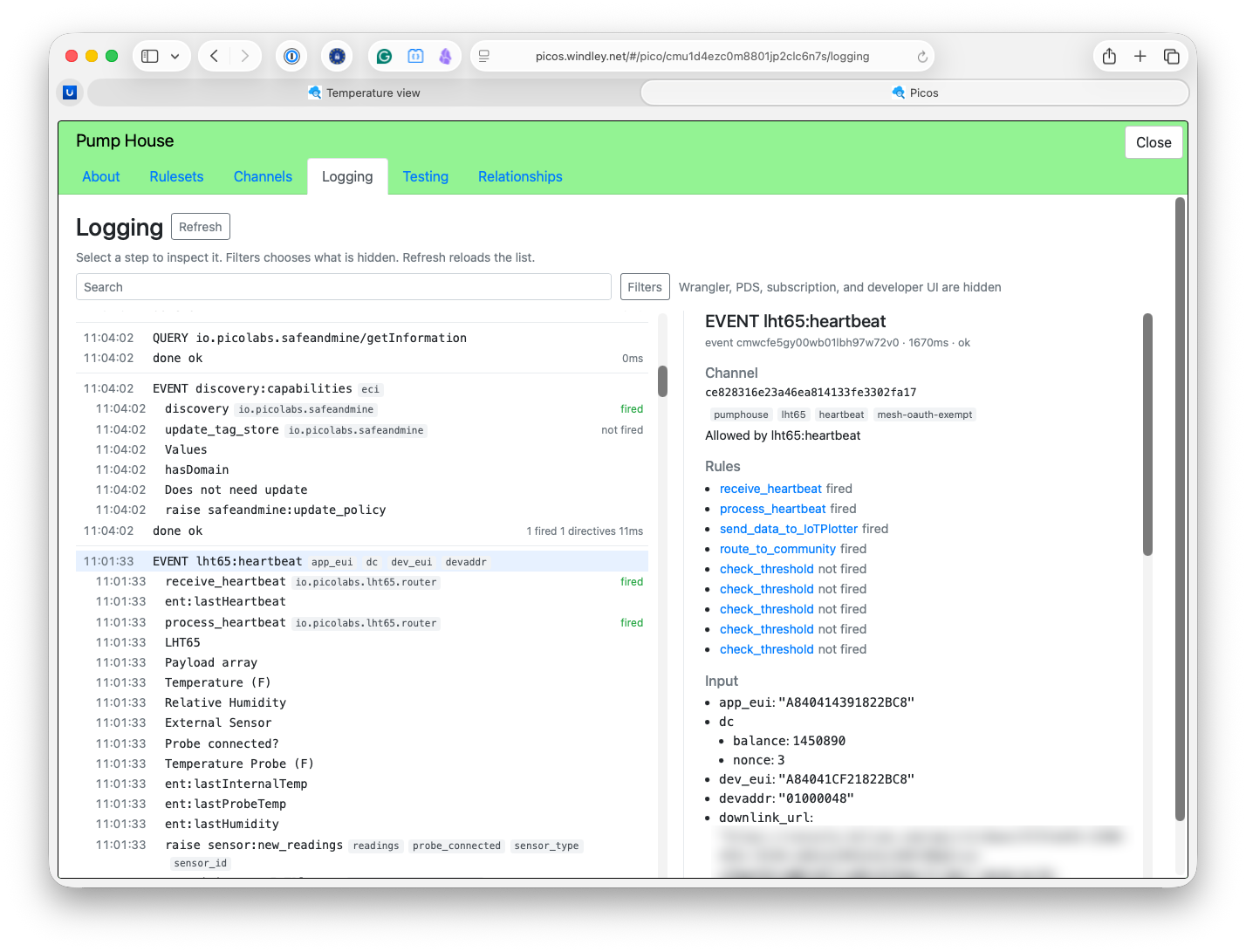
The log is an in-memory ring of the last 200 transactions per pico (set it with PICO_ENGINE_LOG_RING), and it streams new transactions as they happen. Wrangler, PDS, subscription, and developer UI activity stays hidden unless you ask for it in the Filters dialog, so you see what your own rulesets did. When I wrote about release 1.8, I described the developer UI as a way to build in conversation with a live system. Seeing exactly what a pico just did, and why, is the other half of that conversation.
The release has a few smaller changes as well:
Same-engine calls—a
ctx:queryto another pico on the same engine nests under the caller in the log.Owner console—accepts function expressions, such as
.mapcallbacks.Ruleset cache—the engine recompiles a ruleset when its cached JavaScript is incomplete.
Developer UI—the Testing tab remembers your ruleset choice across tabs, and new children keep the box color you picked.
If you want to try picos and views yourself, the quick start will get an engine running. If you’re upgrading an existing engine, the release notes have the details.
What’s Next
Views were the last big engine upgrade standing between picos and the CRM I’m building for the IIW Foundation. The people who will use it run a conference aren’t going to send events from a developer UI. Next I’m moving to the actual implementation with a thin slice through the system: a directory of the people and organizations IIWF works with, the events it runs and their details (the IIW kind of event, not the pico kind), and the catalog of sponsorships available for each one. Each of those will be picos holding the data and views presenting it, with relationships and channel policy deciding who sees what.
A pico has always had its own identity, state, and behavior. With release 1.9, it also has a face that it controls. The interface ships in the same ruleset as the behavior, follows the same policy, and goes wherever the pico goes, so the pico no longer needs another service standing between it and the people it works for.