

Summary: I moved my working LoRaWAN sensor network onto the new Manifold framework and pointed Home Assistant at it as the interface. The port went smoothly until the OAuth protection on the mesh blocked the inbound webhooks Helium uses to deliver readings. The fix was to let a mesh owner scope access channel by channel, and the pico engine now supports it.
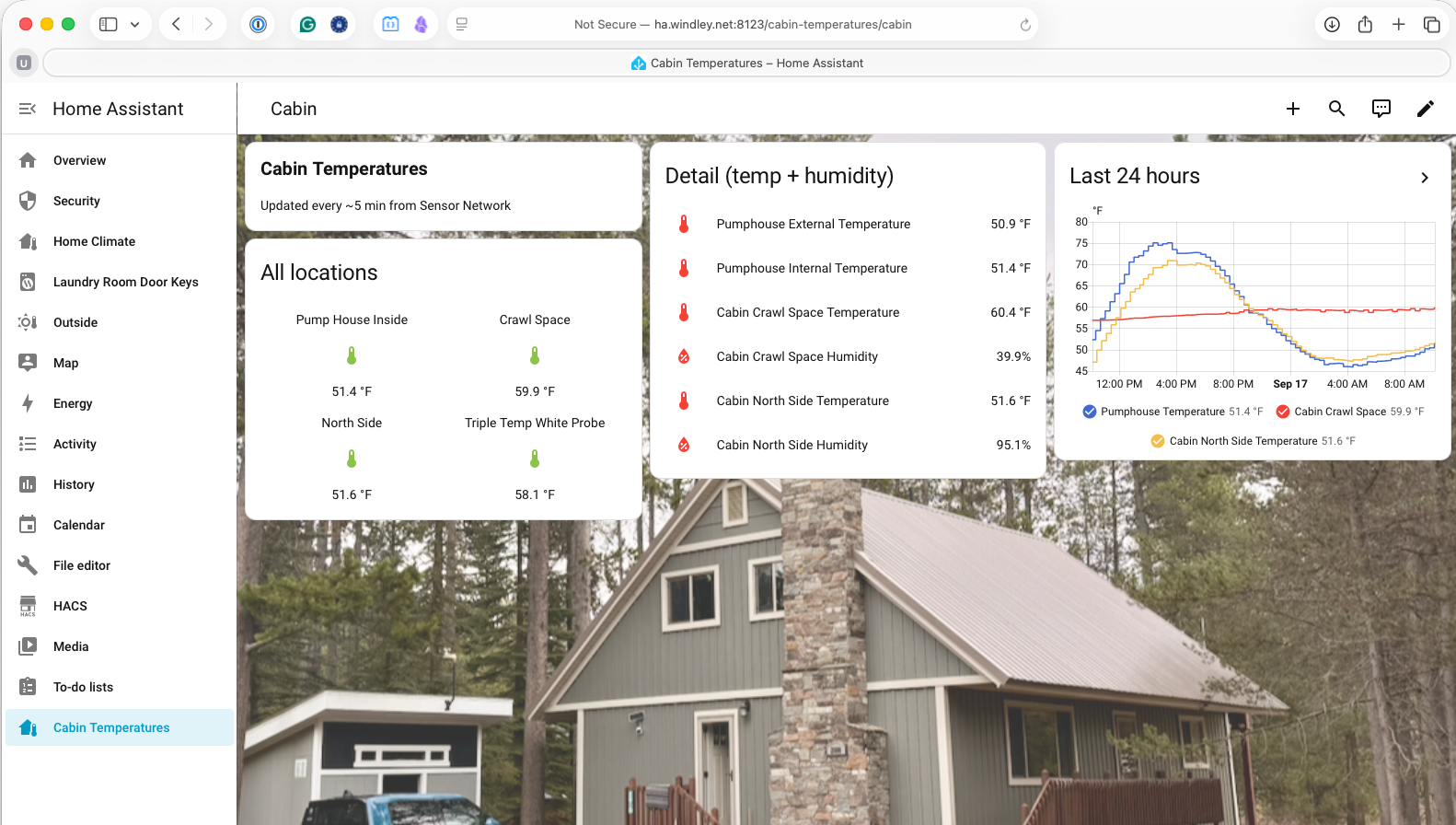
I have been working to make Manifold a good framework for building pico meshes, the kind I use for my network of LoRaWAN sensors. The new Manifold API doesn’t have a UI like the old Manifold did. I want to use Home Assistant (HA) for that and recently created a custom HA integration. With the groundwork laid, it was time to move my actual sensor network onto the new framework running on the updated pico engine. This post describes that move and the problems I ran into, and fixed, along the way.
Manifold as a Framework for Pico Meshes
Manifold began as an application for managing your things and creating communities to group them together. The primary application was Safe and Mine, a QR-code-based tagging system to identify your keys, bags, and mugs. Manifold was expandable with custom applications (written in KRL) that could be added to each thing.
When I rebuilt it as the Manifold API, I stopped treating it as a finished app and started treating it as a framework, a set of domain rulesets other people can extend to build their own meshes. A pico mesh is a small network of independent, addressable computational things, each with its own state, its own rules, and its own relationships. It still supports Safe and Mine, but I wanted it to be more than that—a personal space to manage both inactive (like your mug) and active (like a temperature sensor) things. The reason to build on Manifold is ownership; the mesh belongs to the person who runs it, not to me and not to a platform, and they decide what connects to it and what it exposes.
That distinction is the whole point. I’ve been working for years to build alternatives to what I call the CompuServe of Things. A sensor network you rent from a vendor is legible to the vendor first and to you second. A sensor network that runs as your own pico mesh answers to you, and the framework underneath it exists to keep that relationship intact as the network grows.
The Network I Was Moving
The network I wanted to move is not a demo. It is a working LoRaWAN deployment I have written about before, starting with easier IoT deployments on Helium and then the temperature sensors in a remote pumphouse. I have temperature probes in the crawl space of my cabin, on the north side deck, and in my beehive in addition to the pumphouse. Those sensors report over Helium, and until now they ran on the old sensor-network code, essentially recreating the features of the Manifold framework in addition to their specific duties interpreting and managing the payloads received over LoRaWAN.
Rebuilding the network on top of Manifold simplifies the code and gives the sensors additional capabilities. Each sensor becomes a thing in a community, with an owner pico above the Manifold pico that ties the whole mesh together. The structure is easier to see than to describe, so here is the mesh as it stands after the move.
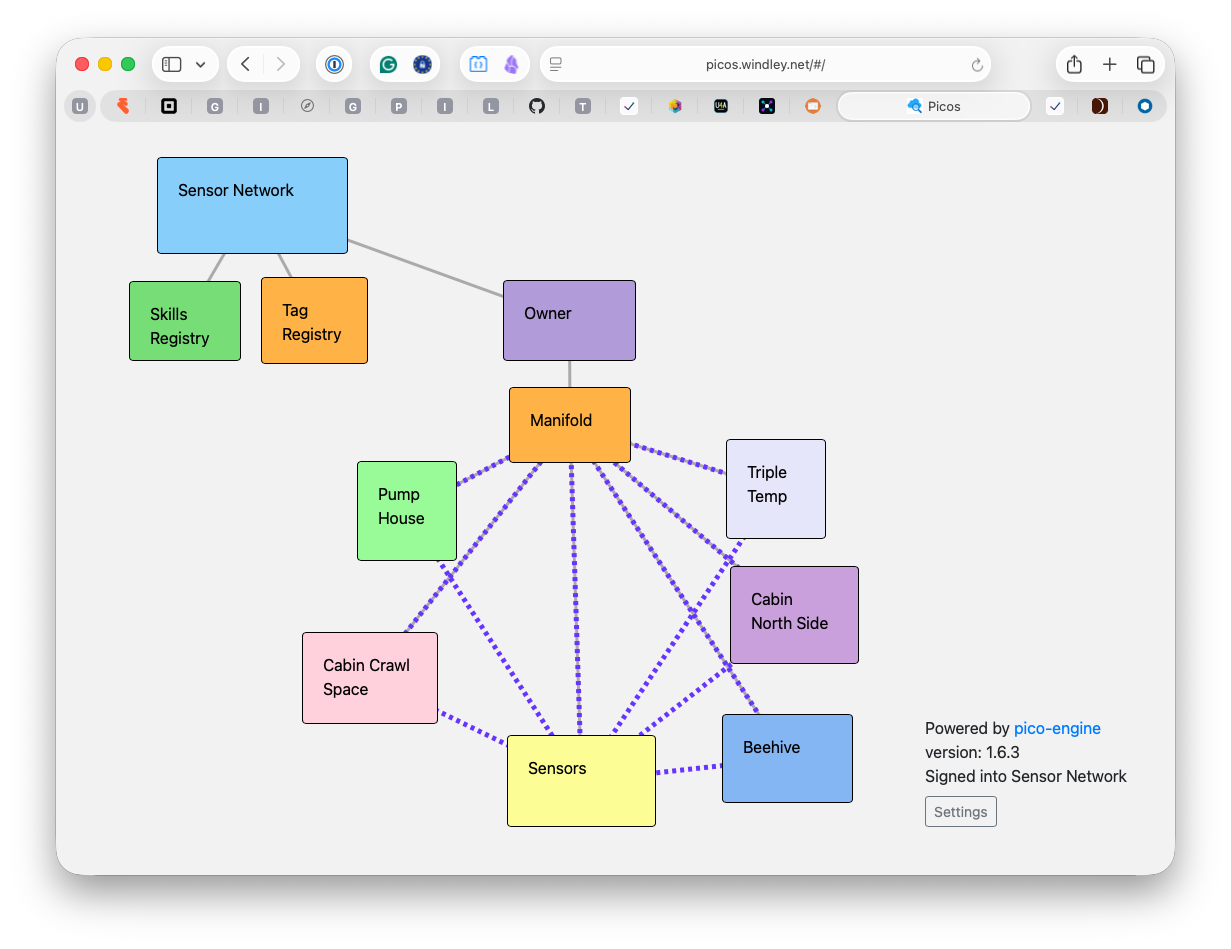
Everything below the Manifold pico is a sensor or a community. The pumphouse, cabin crawl space, cabin north side deck, triple-temperature probe, and beehive are sensors. The Sensors pico is a Manifold community pico for the sensors. It handles things like notifications, sensor initiation, and reading aggregation. Moving to Manifold didn’t change what the sensors measure, but it makes them more capable and manageable. And having them in a standard mesh means I can write HA integrations that work for lots of different meshes.
Home Assistant as the Interface
Because the new Manifold API has no interface of its own, I spent some time making Home Assistant fill that role. In Using Home Assistant with Manifold I described the integration: Home Assistant runs the pico engine’s OAuth flow, comes away with a scoped token, and reads the mesh through it. That gives me dashboards, history, and alerts on software many people already run at home, without my having to write a UI of my own. The sensor network ships a companion Home Assistant component so its sensor things show up as real temperature and humidity entities, not just generic mesh objects. The code serves as an example of how to write HA companion components that work with the Manifold integration.
Where It Broke: OAuth Meets Webhooks
The initial port looked good. Every sensor came across, the communities lined up, and the readings flowed into the mesh the way they had before. The trouble started when I wired the mesh to Home Assistant, because that connection depends on the OAuth protection I added to the engine in Identity for the Pico Engine. Turning on OAuth secured the mesh against outside access, which is exactly what I wanted for Home Assistant; it also secured the mesh against webhook calls from Helium, which is not what I wanted at all.
Helium delivers sensor readings by calling a webhook defined on the pico for a specific sensor. The Helium console is software sitting outside my mesh that needs to POST data in, on its own schedule, with no human present to complete a login. The same protection that made Home Assistant’s access deliberate and revocable made the inbound webhook fail with an authorization error. That is the tension at the center of this move: authentication that assumes a person in the loop breaks the moment a machine needs to knock on the door.
Two Ways Through
There are two reasonable ways to let a machine through without tearing down the protection around everything else. Picos define webhooks by creating channels. Each channel has a policy saying what events and queries are allowed on that channel.
Client-credentials channels. The engine already supports OAuth client credentials for a channel. I described this feature in Identity for the Pico Engine. A channel configured this way lets the caller authenticate as itself, against that one channel, rather than as a person against the whole mesh. You configure the bearer token in Helium as part of defining the webhook and Helium includes it on each POST.
Owner-declared exempt channels. Alternately, the mesh owner can mark a channel as exempt from the OAuth protection. This is only safe when the channel’s policy is tight enough to keep the exemption from becoming an open door, and in this case it is, because the channel accepts one narrow shape of sensor data and nothing else.
Both of these approaches rely on the owner being careful about scoping the authority of the webhook so that it doesn’t represent a security threat. Neither one weakens the mesh as a whole, and neither one hands a machine the standing of a person. I updated the pico engine to support the owner-declared exemption, so the choice now belongs where it should, with the person who runs the mesh, decided channel by channel rather than for the network all at once.
The Window onto the Mesh
With data flowing again, Home Assistant does exactly what I hoped. The dashboard at the top of this post is my cabin: the pumphouse, the crawl space, the north side deck, each updating every few minutes from the sensor network now running on Manifold. I get history, thresholds, and a picture of the current temperatures at a glance, all from software I run.
Home Assistant also makes alerting easier. I already had notifications on the old setup, but each one was its own bit of wiring off to the side; Home Assistant keeps the readings, the history, and the rules that act on them together in one place. I can build an automation directly on a reading, so a low temperature in the pumphouse sends me a notification while there is still time to act, rather than after a freeze has cracked a pipe and left the cabin without water. Having that alongside everything else I watch, instead of bolted on separately, is exactly what I want an interface for the mesh to do.
None of this is a new capability so much as a boundary drawn in the right place. The reading Helium sends and the reading Home Assistant shows are the same as they were a year ago. What changed is the software and systems are less creaky and easier to manage and update. The mesh belongs to the person who runs it, and Home Assistant is just a window onto it.